$cat file-descriptors.md
Introduction
I’m pretty sure if you have been coding in C or any other low-level Programming Language you must have stumbled across the term File Descriptors , But what they heck are they? Let’s take a deep dive and find out.
What is a File Descriptor?
In a Unix type system, a File Descriptor (FD in short) a small positive number used as reference to an open file in a process. In most Operating systems (especially Unix/Linux), Everything is treated like a file. Not just your “.txt” or “.cpp” files. So, according to OS :
- Text file? is a file.
- Directory (folder)? Also a file.
- Keyboard input (stdin)? File.
- Display output (stdout)? File.
- Pipes? Network sockets? Devices? All files.
- Your Life? a file : )
By default, each process systematically inherits three open file descriptors :
| File Descriptor | Name | <unistd.h> |
<stdio.h> |
|---|---|---|---|
0 |
Standard Input | STDIN_FILENO |
stdin |
1 |
Standard Output | STDOUT_FILENO |
stdout |
2 |
Standard Error | STDERR_FILENO |
stderr |
But Why Do We Need File Descriptors?
The operating system needs to store much more than just a file’s location. It needs to track where the file is, its permissions, its mode (read/write/append), the current read/write pointer position, and which process is using it. Using strings to handle all this information would be inefficient and complex. Instead, we use fds - simple positive numbers that the a computer can process easily.
The System’s Representation of Open Files
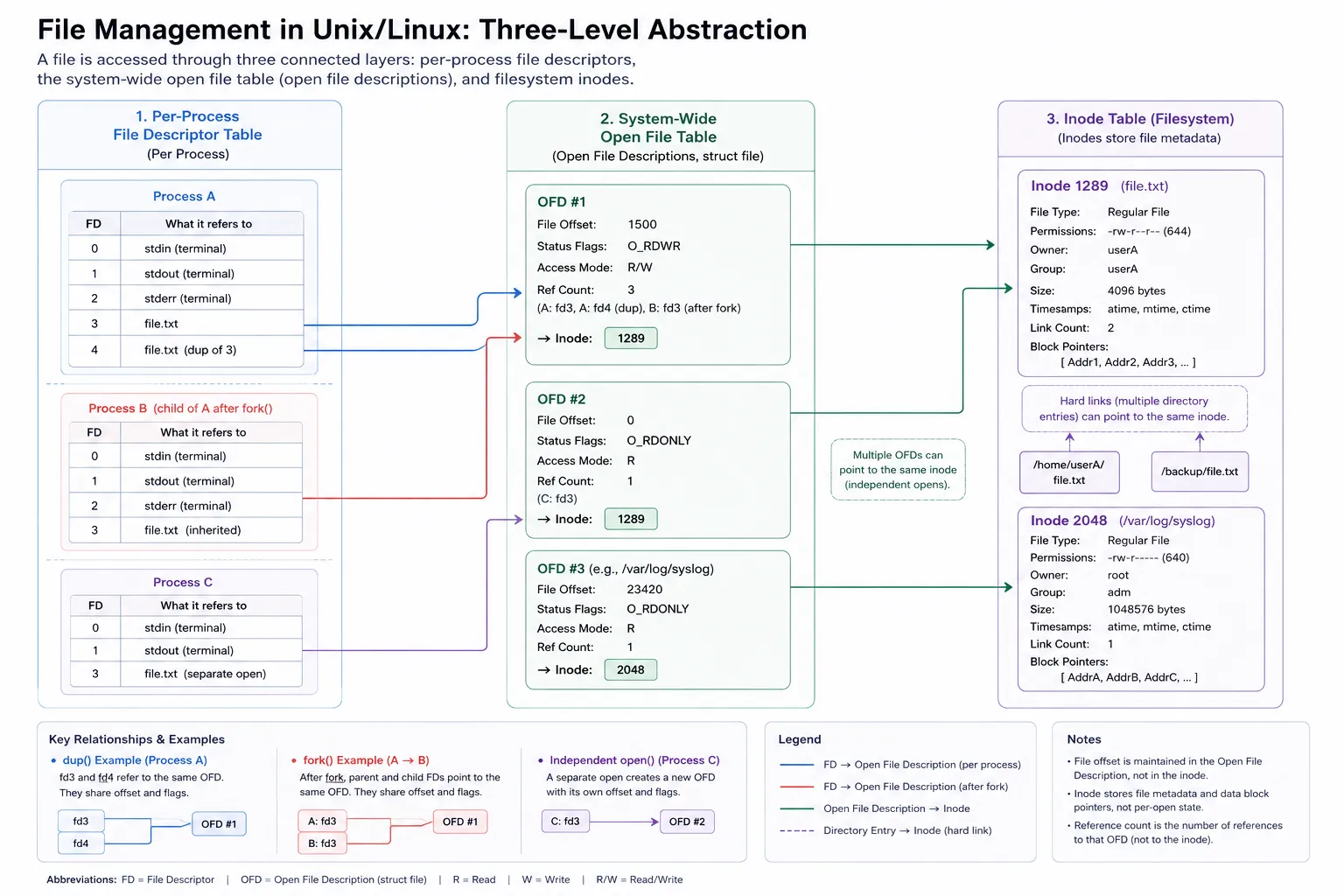
- Per-process File Descriptor Table (Left-most column)
Every process (like Process A, B, C) has it own personal table of file descriptors. Think of fds like a list of shortcuts to files it’s currently using.
- Each entry in this table is just a small number (like 0, 1, 2… aka file descriptors).
- That number points to an entry in the shared Open File Table.
- Example: If Process A has fd = 4, it might point to “File B” in the share table.
Process A             Process B
  ┌────┐                ┌────┐
  │ FD │                │ FD │
  └─┬──┘                └─┬──┘
    ↓                     ↓
┌──────────────┐   ┌──────────────┐
│Open File Tbl │   │Open File Tbl │
│- offset      │   │- offset      │
│- mode        │   │- mode        │
│- ref count   │   │- ref count   │
│- inode ptr   │   │- inode ptr   │
└────┬─────────┘   └────┬─────────┘
     ↓                  ↓
      ┌────────────────────────┐
      │      Inode Table       │
      │ - metadata (size, etc) │
└────────────────────────┘- Open File Table (Middle column in diagram)
This is shared by all processes. It’s like a “what’s open right now” list.
Each entry includes:
- Reference Count: how many file descriptors (from any process) point here.
- Access Mode: like read-only, write, etc.
- Offset: where you are in the file while reading/writing.
- Pointer to Inode: it doesn’t store full file details, just points to where the actual info is (in the inode).
inode stand for index node.
3. Inode Table (Right-most column)
This is where the real metadata about the file lives — and it’s also shared across the system.
Each inode entry has:
- File path (like /home/user/data.txt)
- Size of the file
- Permissions
- Possibly other stuff like timestamps, owner, etc.
Mental Model — 3 Tables
| Layer | Owned By | What it stores |
|---|---|---|
| FD Table | Per-process | Just indexes (like 0, 1, 2) → point to Open File Table |
| Open File Table | Shared across system | Stores offset, access mode, ref count, pointer to inode |
| Inode Table | Kernel-managed | Stores actual file metadata (path, size, perms, etc) |
How Everything Works Together (Real Example)
Let’s say Process A and Process B both want to read the same file: /tmp/log.txt.
Here’s how it plays out step-by-step:
1. Each process gets its own File Descriptor (FD)
- Example: Process A gets fd = 4, Process B gets fd = 3
- These are stored in each process’s own FD table
- Each FD points to a shared Open File Table entry
2. Both FDs point to the same Open File Table entry
- This is like a shared “file session”
- This Open File Table entry contains:
- Access mode (e.g. read-only, write-only)
- Offset (current read/write position)
- Reference count (number of FDs pointing here)
- Pointer to the file’s inode
Offset quick example:
If you read 100 bytes, the offset moves forward — next read picks up where the last one ended.
3. That entry then points to the inode
- The inode holds the actual metadata of the file:
- File path (/tmp/log.txt)
- Permissions
- Size
- Owner, timestamps, etc.
- This inode is shared across the system
Inherited FDs via
fork()
When a process creates a child using fork(), the child process gets a copy of the parent’s FD table.
This means:
- Same file descriptors in both processes
- Point to the same Open File Table entries
- So they share access mode and offset
Example: if parent is mid-way reading a file, the child picks up from that same point unless it duplicates or reopens the file.
Duplicating FDs with dup()/dup2()
Sometimes you want multiple FDs pointing to the same file in the same process.
That’s what dup() and dup2() do:
int new_fd = dup(old_fd); // duplicates old_fd- Both FDs now refer to the same Open File Table entry
- Same offset, same file, same access mode
- Used for redirecting stdout, logging, etc.
Max FDs per process (ulimit -n)
Every process can only open a limited number of FD’s at once.
This limit can be seen with:
ulimit -nTypical default: 1024 (It was 256 on my MacBook)
If you hit this limit, you’ll get weird “too many open files” errors.
Solutions:
- Close unused FDs
- Increase the limit via ulimit or system config
Concurrency & File Locking
If multiple processes are reading and writing the same file — things can get messy fast.
- Data might overlap or get corrupted
- Especially bad when they share offset (via fork() or dup())
Solution: file locking
Use tools like:
flock(fd, LOCK_EX);This ensures only one process can write at a time.
Important Behavior
- If both processes share the same Open File Table entry:
- They share the offset and access mode
- So if A reads 100 bytes, then B will start reading from byte 101
- If they open the file separately, then:
- Each gets their own Open File Table entry
- Offsets and access modes are independent
- Both still point to the same inode (since it’s the same file)
When One Process Closes the File
- The FD is removed from that process’s FD table
- The Open File Table’s reference count is decremented
- If the ref count hits 0:
- The Open File Table entry is deleted
- The inode stays as long as:
- The file still exists on disk or
- Some other process still has it open
Reminder: “File” here doesn’t only mean a text file — it can be a pipe, socket, terminal, etc : )
TL;DR
- FD Table = Process-local handle
- Open File Table = Shared session info
- Inode = Permanent file identity
If your process is opening, reading, writing, or waiting on some external thing, there’s an FD involved.
- File reads/writes
- Network sockets
- Pipes
- Devices (like /dev/null)
- Terminals
FAQs
-
Per-Process table stores FD’s of Parent or Child Process? Ans, per-process table can contain Both Parent and Child (Grand Child and so on) processes. When a child process is created it inherits the Fds of parent by default. Also two child process can point at same file but still will share same Access-mode and offset.
-
What is Offset? It’s the current position in the file for read/write. Example:
- You open a file.
- Start reading — offset starts at 0.
- You read 100 bytes — offset becomes 100.
- Next read will begin from byte 100. It’s just a number internally, looks like:
off_t offset = 100; // means 100 bytes from startEach Open File Table entry has it’s own offset.
-
What if One process wants to read and another wants to write the same file? Happens all the time. Each process:
-
Opens the file with its own access mode (read, write, read+write, etc).
-
Gets its own file descriptor.
-
But both can point to the same open file entry, or get separate ones depending on how they open it. If they share the same Open File Table entry, they share the same offset and mode. If they open it separately, they each get independent access mode + offset. So:
-
Shared FD → Shared mode/offset.
-
Separate FD → Independent mode/offset. OS handles synchronisation issues like file locks if needed.
-
-
Inode table stores metadata about Files. Only files. Each file on disk has one inode. Inode holds:
- Path
- Permissions
- Owner
- Size
- Timestamps
- etc.
Processes are not stored in the inode table.
/proc/
is a virtual file, not a real file on disk. Virtual File : Files which are created in ram by the kernel when the user (OS) asks for it. For example files containing info about CPU and GPU temperature.